carving
biometrics

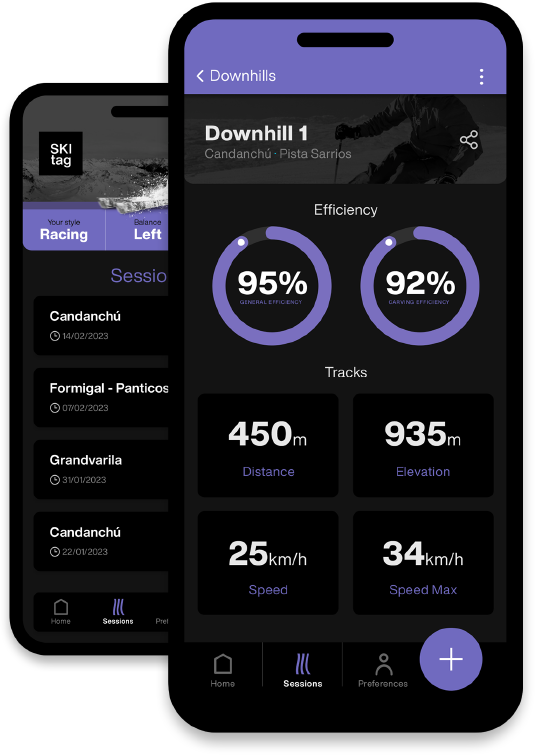
Carry your device in your ski pants’ pocket and use Skitag to record your Carving Biometrics (CARBIO).  Get an Augment Experience while skiing. 

Play Store
SEO Image
SEO Image

AUGMENTED EXPERIENCE

Take a look at your downhill key metrics and carving path. Is it efficient? Do you drift while turning left or right? Is your carving speed the same while turning left or right?

Play Store View Video
SEO Image

carving
biometrics

Carry your device in your ski pants’ pocket and use Skitag to record your Carving Biometrics (CARBIO).  Get an Augment Experience while skiing. 

Play Store

MULTI-DEVICE

Record your carving biometrics (CARBIO) in your iPhone. Have a look at your last downhills key metrics in your Apple Watch display. Train your own AI in your iPad, or in your Mac if you prefer a bigger screen. Or do it all from your iPhone while you are going uphill sitting in a chairlift making time until your next downhill. Keep calm and Skitag everywhere!
Play Store
SEO Image

FAQS

No, you do not need to accept cookies or register in any way. You only have to connect your iCloud account to be able to store the data.

There are two types of data within the Skitag ecosystem. On one hand, there is data related to your ski session: distance, speed, efficiency, balance... so that you know your tendencies. On the other hand, there is the data related your behavior: location and movement. The storage of this data is optional.

You are the only owner of the data. Skitag does not have access to it. 

The data is stored locally on the device that collects it, i.e. an iPhone or Apple Watch. The data is then synced between the other devices associated with your ID. No one else but you will have access to your information.  

At first, Skitag works around a base algorithm, your DOM. The charge will be made when a custom algorithm has been generated for you based on your own style.

Yes, Skitag is only compatible with iOS, since it measures biometric parameters through the location sensor and IMU of the iPhone. You can see the results in your Apple Watch, iPad or Mac. 

Download the Skitag from the App Store. No user nor password needed. Wear your mobile in a place that is comfortable and stable (e.g. in your trousers pocket). Using mobile protection cases might keep the device more stable and protected in case of crash. Start skiing. Watch your downhills. Does your behavioural analytics predictions (i.e. carving) match with the baseline AI algorithm? If yes, great! You are done. Keep enjoying your Augmented Ski Experience. If not, customise your AI algorithm. Start by recording some downhills. Watch and label your carving data. Train your own model. Go Skiing. Do some downhills and watch your predictions. Does it match? Great! You have your own customized AI algorithm, your DOM. You can now use, share or sell it. It doesn’t match yet? Keep training your AI.

Remember to keep your mobile always in the same position to have a better experience. Done? Excellent! Now you can take a look at your behavioural data. Get insights about the way you take a turn. Are you efficient? Are you consistent?